

Ordering API overview
What is Ordering API?
Amazon Business Ordering API allows you to automate your ordering process by integrating your purchasing system with Amazon Business. Your business customers will place orders in the Amazon Business marketplace without visiting Amazon Business or leaving your purchasing system. With Amazon Business Ordering API, your organization and business customers will save time, effort, and reduce repetitive work.
Test this API in the Amazon Business API Explorer!
Benefits of Ordering API
Amazon Business Ordering API provides your organization and your business customers these benefits:
Synchronous order response
Ordering API enables synchronous order responses, improving the customer shopping experience. It eliminates the order response wait time that takes five minutes to couple of hours, resulting in order rejection at times.
Enhanced security
Ordering API uses OAuth 2.0 security protocol that is based on Login With Amazon (LWA). In this model, Amazon Business user account authorizes your application (app) by interacting with pages displayed by Amazon Business and your website. For more information on the OAuth workflow, see Third-party website authorization workflow.
Improved developer experience
Ordering API uses OpenAPI to define our contract. OpenAPI makes it easy for integrators to generate their client code for most programming languages by using readily available tools.
Order information, notifications, and updates
Ordering API helps your customers get order information, such as expected delivery date range, shipment tracking ID, and carrier name. This API also offers an optional subscription to Amazon Simple Notification Service (SNS). By subscribing to Amazon SNS, your customers will receive real-time order updates. Refer to What is Amazon SNS? for more information.
How Ordering API works
You can place orders and retrieve order status by calling Ordering API.
Operations
Ordering API provides two operations:
| Operation | Method | Path | Description |
|---|---|---|---|
placeOrder | POST | /ordering/2022-10-30/orders | Places an order with the attributes and expectations from the order request. |
orderDetails | GET | /ordering/2022-10-30/orders/{externalId} | Retrieves order details by the order's external ID. |
Placing an order with the Ordering API placeOrder operation requires the following details:
- a unique user-defined identifier
- line items to be included in the purchase order
- attributes containing properties that a customer would select during the ordering flow, such as the shipping address and payment method
- expectations about the order that the customer does not directly control, such as the unit price
After a successful placeOrder request, Ordering API attempts to fulfill the order given the product identifiers, expectations, and attributes present in the request. The way the order is fulfilled depends on the details provided in the request and the safeguards present in your Amazon Business account. For more information, see Safeguards.
Once an order is placed, you can call the orderDetails operation and provide the ID for your desired order to retrieve the order status. This status update includes details such as the order’s shipping status and expected delivery date.
Available regions
Ordering API is available in the following regions and marketplaces:
| Region | Marketplaces |
|---|---|
| NA | US, CA, MX |
| EU | UK, DE, FR, IT, ES, IN |
| FE | JP, AU |
Polymorphism
Attributes and expectations in Ordering API are polymorphic. This means there are many specific subtypes of an attribute or expectation. When an attribute or expectation is required in a request, a specific subtype is selected in its place. The subtype's schema name must be passed as a discriminator to indicate which subtype it is. For example, a request to pass an order-level SelectedProductReference attribute would look like this:
{
  "externalId": "[oroder-12345]",
  "lineItems": [],
  "attributes": [
    {
      "attributeType": "SelectedProductReference",
      "productReference": {
        "productReferenceType": "ProductIdentifier",
        "id": "[asin]"
      }
    }
  ],
  "expectations": []
}
The attributeType property contains the exact, case-sensitive schema name of the subtype, SelectedProductReference. This is in addition to the actual contents of the attribute, which is the value of the productReference property.
The value of the productReference property is of type ProductReference, which is polymorphic, hence the productReferenceType discriminator property. The concrete subtype used is ProductIdentifier, which contains the product’s ASIN. It’s unacceptable to pass a value other than a defined subtype schema name in a discriminator property because it will result an error. It’s unacceptable to pass the supertype schema name in the attributeType discriminator property.
Safeguards
Product price and availability changes over time. Ordering API accommodates this variation by working in conjunction with order safeguards. Safeguards are constraints between the customer's expectations and Amazon Business order fulfillment. For example, you could define a safeguard so that if an item unit price increases by more than 20%, Ordering API rejects the line item.
If the safeguards are turned on, the constraints are evaluated against the customer's expectations and the Amazon Business order fulfillment. The API request will include a unit price expectation for each line item.
Here are the safeguards that get evaluated against expectations.
| Safeguard | Expectation |
|---|---|
Item price | ExpectedUnitPrice at line item level. |
Item subtotal | ExpectedCharge at line item level. |
Order total | ExpectedCharge at order level. |
{
  "externalId": "[order-12345]",
  "lineItems": [
    {
      "externalId": "[line-item-1]",
      "quantity": 5,
      "attributes": [
        {
          "attributeType": "SelectedProductReference",
          "productReference": {
            "productReferenceType": "ProductIdentifier",
            "id": "[asin]"
          }
        }
      ],
      "expectations": [
    {
     "expectationType": "ExpectedUnitPrice",
          "amount": {
       "currencyCode": "USD",
            "amount": 10.00
          }
        }
      ]
    }
  ],
  "attributes": [],
  "expectations": []
}
In the example, the request is for five units of a single product with ASIN, [asin], with an expected price of $10.00 for each unit. The order-level attributes and expectations are omitted for simplicity. Ordering API will evaluate the request against actual offerings. If the price of the item doesn't exceed $12.00, Ordering API will place an order. That is 20% more than expected. If no offering is below $12.00, Ordering API rejects the line item but will continue to process other line items. If there are no other line items, Ordering API will reject the order.
{
  "externalId": "line-item-1",
  "acceptedItems": [],
  "rejectedItems": [
      {
          "quantity": 5,
          "artifacts": [
              {
                  "rejectionArtifactType": "RejectionGroup",
                  "supportingArtifacts": [
                      {
                          "rejectionArtifactType": "RejectionMessage",
                          "message": "Insufficient stock or no offer complies with your safeguards."
                      },
                      {
                          "rejectionArtifactType": "RejectionCode",
                          "code": "008-007"
                      }
                  ]
              },
              {
                  "rejectionArtifactType": "UnavailableQuantity",
                  "quantity": 5
              }
          ]
      }
  ]
}
Seller Substitutions
The Seller Substitutions safeguard allows you to get substitute items from other sellers when an item is unavailable. This safeguard can affect how Ordering API selects buying options (offers for an item on the Amazon Business catalog) to fulfill an order request.
Ordering API selects the buying option for an order line item based on a combination of the following details:
- The product in the request, identified by the ASIN in the
SelectedProductReferenceattribute. - The buying option in the request, identified by the offer ID in the
SelectedBuyingOptionReferenceattribute. - The configuration of the Seller Substitutions safeguard.
If a valid buying option is present in the request, Ordering API will perform the following actions:
- Select as much quantity of this buying option as possible. Note that the constraints within the Seller Substitutions safeguard do not apply here.
- If any quantity remains unfilled for the line item (either because Amazon didn’t have enough quantity available, or because the buying option reference was invalid) and Seller Substitutions are enabled, Ordering API will perform the following actions:
- Find substitute buying options based on the product reference in the request, filtered as specified in the Seller Substitutions safeguard.
- Fill the remaining quantity for the line item by selecting buying options in descending order of preference (typically, this is in ascending order of price; more generally, we try to maximize the quantity filled within the customer’s safeguard tolerances).
- If any quantity remains unfilled after substitution, proceed according to the configuration of the Low stock and Item unavailable safeguards.
If a buying option reference is not present in the request or is invalid, Ordering API proceeds from Step 2 above.
Example 1:
The request contains a product reference [ASIN] and a valid buying option reference [Buying Option ID] that has 5 or more quantity available. The buying option has a price of $9.99, which is within the tolerances allowed by customer-configured unit price safeguards. This buying option is used to fill all the quantity in the request, yielding a subtotal of $49.95 (5 * $9.99).
Click to expand
{
    "externalId": "line-item-1",
    "quantity": 5,
    "attributes": [
        {
            "attributeType": "SelectedProductReference",
            "productReference": {
                "productReferenceType": "ProductIdentifier",
                "id": "[ASIN]"
            }
        },
        {
            "attributeType": "SelectedBuyingOptionReference",
            "buyingOptionReference": {
                "buyingOptionReferenceType": "BuyingOptionIdentifier",
                "id": "[Buying Option ID]"
            }
        }
    ]
}
{
    "externalId": "line-item-1",
    "acceptedItems": [
        {
            "quantity": 5,
            "artifacts": [
                {
                    "acceptanceArtifactType": "UnitPrice",
                    "amount": {
                        "currencyCode": "USD",
                        "amount": 9.99
                    }
                },
                {
                    "acceptanceArtifactType": "Charge",
                    "category": "SUBTOTAL",
                    "amount": {
                        "currencyCode": "USD",
                        "amount": 49.95
                    }
                }
            ]
        }
    ],
    "rejectedItems": []
}
Example 2:
The request contains a product reference [ASIN] and a valid buying option reference [Buying Option ID] that has only 3 quantity available. Seller Substitutions are enabled, so 2 remaining quantity is filled by the cheapest available marketplace offer, at a price of $10.99. This yields a subtotal of $51.95 (3 $9.99 + 2 $10.99).
Click to expand
{
    "externalId": "line-item-1",
    "quantity": 5,
    "attributes": [
        {
            "attributeType": "SelectedProductReference",
            "productReference": {
                "productReferenceType": "ProductIdentifier",
                "id": "[ASIN]"
            }
        },
        {
            "attributeType": "SelectedBuyingOptionReference",
            "buyingOptionReference": {
                "buyingOptionReferenceType": "BuyingOptionIdentifier",
                "id": "[Buying Option ID]"
            }
        }
    ]
}
{
    "externalId": "line-item-1",
    "acceptedItems": [
        {
            "quantity": 3,
            "artifacts": [
                {
                    "acceptanceArtifactType": "UnitPrice",
                    "amount": {
                        "currencyCode": "USD",
                        "amount": 9.99
                    }
                },
                {
                    "acceptanceArtifactType": "Charge",
                    "category": "SUBTOTAL",
                    "amount": {
                        "currencyCode": "USD",
                        "amount": 29.97
                    }
                }
            ]
        },
        {
            "quantity": 2,
            "artifacts": [
                {
                    "acceptanceArtifactType": "UnitPrice",
                    "amount": {
                        "currencyCode": "USD",
                        "amount": 10.99
                    }
                },
                {
                    "acceptanceArtifactType": "Charge",
                    "category": "SUBTOTAL",
                    "amount": {
                        "currencyCode": "USD",
                        "amount": 21.98
                    }
                }
            ]
        }
    ],
    "rejectedItems": []
}
Example 3:
The request contains a product reference [ASIN] and a valid buying option reference [Buying Option ID] that has only 3 quantity available. Seller Substitutions are disabled, so the 2 remaining quantity is rejected. This yields a subtotal of $29.97 (3 _ $9.99).
Note that which portion of the order is rejected may change based on the value of the Low stock and Item unavailable safeguards. It is possible for just the unfilled quantity, whole line item, or even the entire order to be rejected.
Click to expand
{
    "externalId": "line-item-1",
    "quantity": 5,
    "attributes": [
        {
            "attributeType": "SelectedProductReference",
            "productReference": {
                "productReferenceType": "ProductIdentifier",
                "id": "[ASIN]"
            }
        },
        {
            "attributeType": "SelectedBuyingOptionReference",
            "buyingOptionReference": {
                "buyingOptionReferenceType": "BuyingOptionIdentifier",
                "id": "[Buying Option ID]"
            }
        }
    ]
}
{
    "externalId": "line-item-1",
    "acceptedItems": [
        {
            "quantity": 3,
            "artifacts": [
                {
                    "acceptanceArtifactType": "UnitPrice",
                    "amount": {
                        "currencyCode": "USD",
                        "amount": 9.99
                    }
                },
                {
                    "acceptanceArtifactType": "Charge",
                    "category": "SUBTOTAL",
                    "amount": {
                        "currencyCode": "USD",
                        "amount": 29.97
                    }
                }
            ]
        }
    ],
    "rejectedItems": [
        {
            "quantity": 2,
            "artifacts": [
                {
                    "rejectionArtifactType": "RejectionGroup",
                    "supportingArtifacts": [
                        {
                            "rejectionArtifactType": "RejectionMessage",
                            "message": "Insufficient stock or no offer complies with your safeguards."
                        },
                        {
                            "rejectionArtifactType": "RejectionCode",
                            "code": "008-007"
                        }
                    ]
                },
                {
                    "rejectionArtifactType": "UnavailableQuantity",
                    "quantity": 2
                }
            ]
        }
    ]
}
Example 4:
The request contains a product reference [ASIN] and no buying option reference. Seller Substitutions are enabled, so all 5 quantity is filled using the cheapest available marketplace offers; the cheapest available offer has a price of $10.99, but only 4 quantity. The remaining single quantity is filled using the next available marketplace offer, at a price of $11.99. This yields a subtotal of $55.95 (4 $10.99 + 1 $11.99).
Click to expand
{
    "externalId": "line-item-1",
    "quantity": 5,
    "attributes": [
        {
            "attributeType": "SelectedProductReference",
            "productReference": {
                "productReferenceType": "ProductIdentifier",
                "id": "[ASIN]"
            }
        }
    ]
}
{
    "externalId": "line-item-1",
    "acceptedItems": [
        {
            "quantity": 4,
            "artifacts": [
                {
                    "acceptanceArtifactType": "UnitPrice",
                    "amount": {
                        "currencyCode": "USD",
                        "amount": 10.99
                    }
                },
                {
                    "acceptanceArtifactType": "Charge",
                    "category": "SUBTOTAL",
                    "amount": {
                        "currencyCode": "USD",
                        "amount": 43.96
                    }
                }
            ]
        },
        {
            "quantity": 1,
            "artifacts": [
                {
                    "acceptanceArtifactType": "UnitPrice",
                    "amount": {
                        "currencyCode": "USD",
                        "amount": 11.99
                    }
                },
                {
                    "acceptanceArtifactType": "Charge",
                    "category": "SUBTOTAL",
                    "amount": {
                        "currencyCode": "USD",
                        "amount": 11.99
                    }
                }
            ]
        }
    ],
    "rejectedItems": []
}
Example 5:
The request contains a product reference [ASIN] and no buying option reference. Seller Substitutions are disabled, leaving no source of buying options, so all 5 quantity is rejected.
Note that this may also result in the entire order being rejected, depending on the configuration of the Low stock and Item unavailable safeguards.
Click to expand
{
    "externalId": "line-item-1",
    "quantity": 5,
    "attributes": [
        {
            "attributeType": "SelectedProductReference",
            "productReference": {
                "productReferenceType": "ProductIdentifier",
                "id": "[ASIN]"
            }
        }
    ]
}
{
    "externalId": "line-item-1",
    "acceptedItems": [],
    "rejectedItems": [
        {
            "quantity": 5,
            "artifacts": [
                {
                    "rejectionArtifactType": "RejectionGroup",
                    "supportingArtifacts": [
                        {
                            "rejectionArtifactType": "RejectionMessage",
                            "message": "Insufficient stock or no offer complies with your safeguards."
                        },
                        {
                            "rejectionArtifactType": "RejectionCode",
                            "code": "008-007"
                        }
                    ]
                },
                {
                    "rejectionArtifactType": "UnavailableQuantity",
                    "quantity": 5
                }
            ]
        }
    ]
}
Result
An order is processed while containing a subset of the requested line items or the requested quantity for those line items. This means parts of the order get rejected. Ordering API will show which part of the order gets rejected with artifacts.
The Ordering API result will consist of:
• line items with accepted and rejected portions
• acceptance artifacts
• rejection artifacts
In the example, discussed in Safeguards section, a line item was rejected because of an item price constraint. But because there are other line items, Ordering API will continue to process the other line items in the request.
In the Mexico region, orders placed via Ordering API will generate PDF Facturas electrónicas (CFDI) . These invoices will be accessible in the Your Orders screen. For more information, see Amazon Business Mexico support .
Complete fulfillment
Line items are broken up into accepted portions (quantity that is available), and rejected portions (quantity that isn’t available). The net quantity across all these items for a single line item will add to the originally requested quantity.
{
  "externalId": "[order-12345]",
  "lineItems": [
    {
      "externalId": "line-item-1",
      "quantity": 5,
      "attributes": [
        {
          "attributeType": "SelectedProductReference",
          "productReference": {
            "productReferenceType": "ProductIdentifier",
            "id": "[asin]"
          }
        }
      ]
    }

  ],
  "attributes": [],
  "expectations": []
}
This is a request for five units of a single product with ASIN, [asin]. The order-level attributes and expectations were omitted for simplicity. The response means all five units of the product are available.
{
  "lineItems": [
    {
      "externalId": "line-item-1",
      "acceptedItems": [
        {
          "quantity": 5,

          "artifacts": [
            {
              "acceptanceArtifactType": "Charge",
              "category": "SUBTOTAL",
              "type": "PRINCIPAL",
              "amount": {
                "currencyCode": "USD",
                "amount": 9.99
              }
            }
          ]
        }
      ],
  "rejectedItems": []
    }
  ],
  "acceptanceArtifacts": [],
  "rejectionArtifacts": []
}
The line item's
externalIdis the user-supplied value in the request line item. The items in the result are linked to the items in the request. There are norejectedItemsbecause all five units of this item are available.
Partial fulfillment
A customer has configured a safeguard to send what's available. Instead of rejecting the item or order, Ordering API will fulfill the item partially and reject the remaining quantity.
Sample: Three units of the item are available and met the customer's expectations.
{
  "lineItems": [
    {
      "externalId": "line-item-1",
      "acceptedItems": [
        {
          "quantity": 3,
          "artifacts": [
            {
              "acceptanceArtifactType": "Charge",
              "category": "SUBTOTAL",
              "type": "PRINCIPAL",
              "amount": {

                "currencyCode": "USD",
                "amount": 9.99
              }
            }
          ]
        }
  ],
      "rejectedItems": [
        {
          "quantity": 2,
          "artifacts": [
            {
              "rejectionArtifactType": "RejectionCode",

              "code": "008-008"
            },
            {
              "rejectionArtifactType": "RejectionMessage",
              "message": "Item is out of stock."
            }
          ]
        }
      ]
    }
  ],
  "acceptanceArtifacts": [],
  "rejectionArtifacts": []
}
The total quantity across the accepted and rejected items remains five, which matches the requested quantity.
Total rejection
A customer has configured a safeguard that removes the line item or rejects the order if the requested quantity isn’t available.
{
  "lineItems": [
    {
      "externalId": "line-item-1",
      "acceptedItems": [],
      "rejectedItems": [
        {
          "quantity": 3,
          "artifacts": [
            {
              "rejectionArtifactType": "AvailableQuantity",
              "quantity": 3
            }
          ]
        },
        {
          "quantity": 2,
          "artifacts": [
            {
              "rejectionArtifactType": "RejectionCode",
              "code": "008-008"
            },
            {
              "rejectionArtifactType": "RejectionMessage",
          	"message": "Item is out of stock."
            }

          ]
        }
      ]

       }
  ],
  "acceptanceArtifacts": [],
  "rejectionArtifacts": []
}
In the example, the three units become part of rejected items. The rejected items indicate that the quantity was available but rejected due to other constraints. The total quantity across all items adds to five. The order-level artifacts are omitted for simplicity.
Getting started
There are two parts in the onboarding process. First, the developer partner onboarding. Second, the customer onboarding on the Ordering API.
Developer partner onboarding
Amazon Business will work with you in completing your onboarding. The process takes four to six weeks and it involves:
Step 1. Submit your developer profile request
Step 2. Create an app client in Solution Provider Portal
Step 3. Authorize your Amazon Business API apps
Step 4. Create your request
Step 5. Configure Amazon SNS
Step 6. Activate the SNS feature
After completing Step 5. Configure Amazon SNS, please contact your Amazon Business Customer Advisor and share your IAM Publish Role and SNS topic ARNs. The Amazon Business Customer Advisor will connect with the team who will activate the SNS feature, and sends you a status update:
{"externalRequestId":"external-order-id-12345"}
Step 7. Test your configuration
To test the configuration, use externalId as path parameter.
Path - GET /ordering/2022-10-30/orders/{externalId}
With ActualOrder: Path - GET /ordering/2022-10-30/orders/external-order-id-12345
GET /ordering/2022-10-30/orders/11-123456789
{
"x-amz-user-email":"[[email protected]]"
}
{
        "lineItems": [
          {
            "externalId": "line-item-1",
            "acceptedItems": [
               {
                "quantity": 5,
                "artifacts": [
                {
                  "acceptanceArtifactType": "Charge", "category": "SUBTOTAL",
                  "type": "PRINCIPAL",
                  "amount": {
                      "currencyCode": "USD",
                      "amount": 9.99
                     }
                    }
                  ]
                }
               ],
        "rejectedItems": []
          }
        ],
        "acceptanceArtifacts": [],
        "rejectionArtifacts": []
}
Customer onboarding
After completion of API integration, onboard your business customers to Amazon Business Ordering API. Ask your business customers to complete these steps:
Step 1. Create an Amazon Business account
Step 2. Create a group
Step 3. Configure the purchasing system and generate a unique group identifier
Step 4. Set up the purchasing preference
Step 5. Add a payment method
Step 6. Switch the setting of the purchasing system from test mode to active mode
Step 7. Add user to a group
Step 1. Create an Amazon Business account
Create an Amazon Business account for the desired Amazon Business store.
Step 2. Create a group
- Sign in to your Amazon Business account. Navigate to Account Details > Business Settings. The Business setting displays.
- Navigate to Members > Groups. Select Groups.
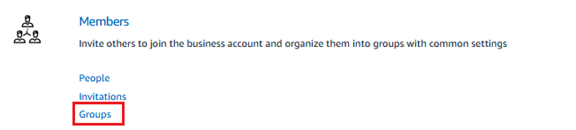
The group setting displays.
- Select Add Group.
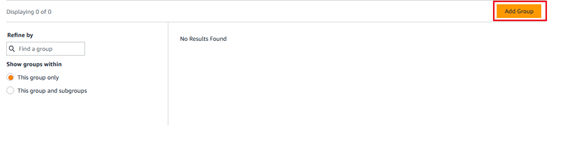
The Create Group displays.
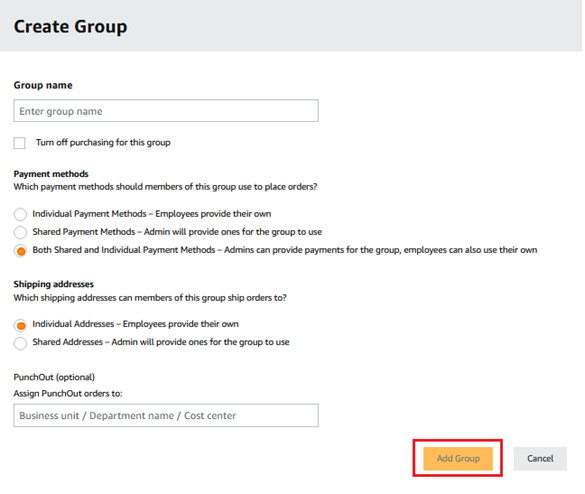
- In the Group name text box, enter the name of the group that is allowed to access your purchasing system.
Sample group name: OrderingAPI_TestGroup
In the future, if you decide to revoke the access permission for this group, select the box turn off purchasing for this group.
-
Select the applicable payment methods and shipping addresses for the group.
-
Select Add Group. The group is added to the list.

Step 3. Configure the purchasing system and generate a unique group identifier
- Select the group name. In the example, the group name is OrderingAPI_TestGroup. The page for this group displays.
- Navigate to System integrations > Configure purchasing system.
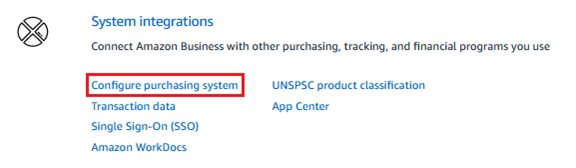
- On the next screen, place your mouse cursor in the search box. The list of available purchasing systems displays. Select your purchasing system.
The group identifier generated here is your BuyingGroup reference in the Ordering APIrequest.
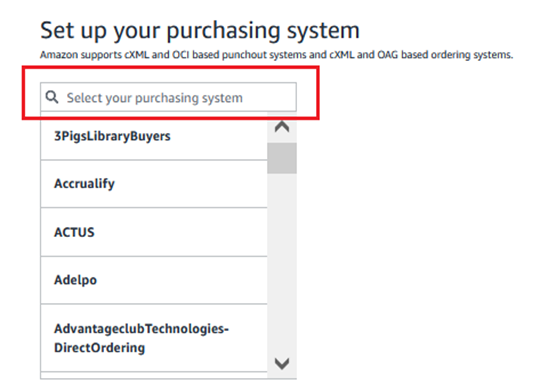
If your purchasing system isn’t in the list, enter Ordering-API in the search box. Select Ordering API.
A screen detailing the unique group identifier displays. Select Save.
Step 4. Set up the purchasing preference
- Navigate to System integrations > Configure purchasing system.
- Navigate to Order safeguards. Select Edit.

The next screen provides option for setting how to handle order requests.
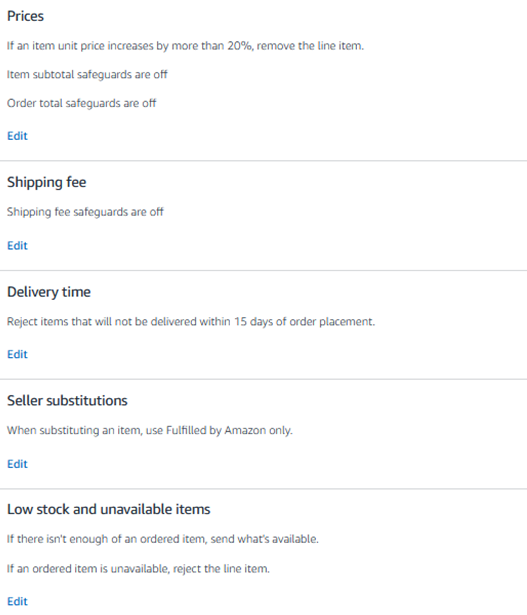
- Select Edit to set the option for each safeguard.
- Select Save.
Step 5. Add a payment method
Manage the checkout preferences by adding a payment method.
- Navigate to Payment Method > Add a payment method.
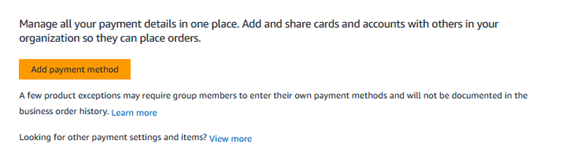
- Select Add payment method.
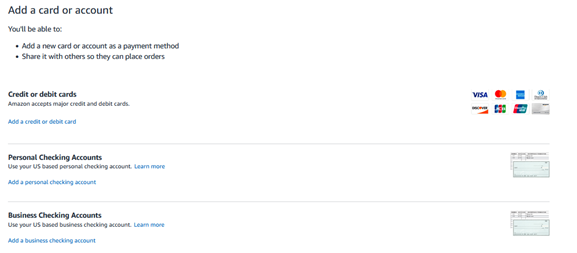
- Select the applicable payment method: credit or debit cards, personal checking accounts, or business checking accounts.
Step 6. Switch the setting of the purchasing system from test mode to active mode

Once the setup and integration meets your expectations, switch the setting of the purchasing system from Test Mode to Active Mode:
- Navigate to Systems Integration > Purchasing system.
- Select Switch to Active mode.
After a group is turned to Active mode, all orders made using the group will be shipped and charged.
Step 7. Add user to a group
The Purchase Order will reach Amazon Business when there’s an assigned group and users in the purchasing system.
- Select the group name.
In the example, the group name is OrderingAPI_TestGroup. The page for this group displays.
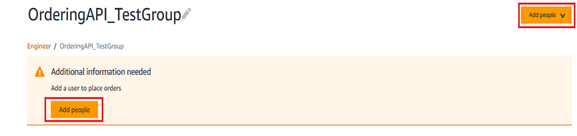
- Select Add people.
The next screen will allow you add people for this group. You have these options: Invite by email, Upload a spreadsheet, or Share an invite link.
Invite by email
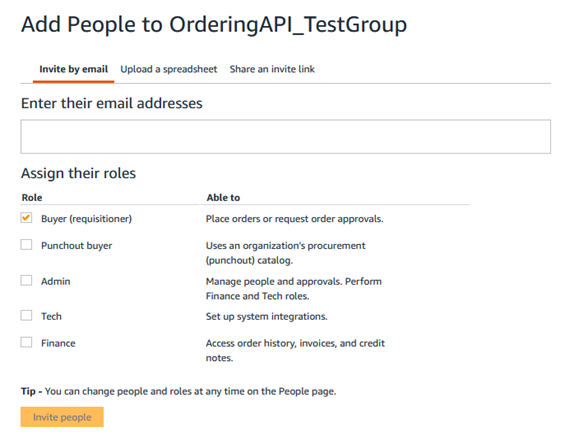
- Enter the email address of the people who is allowed to access your purchasing system.
- Select Buyer (requisitioner).
- Select Invite people.
Upload a spreadsheet
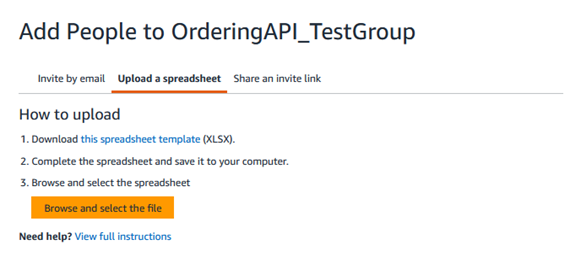
- Select this spreadsheet template.
- Open the spreadsheet file and make changes.
- Save the file in your local folder.
- Select Browse and select the file to upload the spreadsheet.
The page displays the number of entries to process.
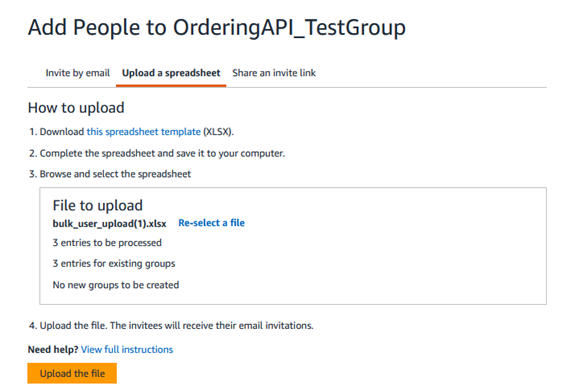
- Select Upload the file.
Share an invite link
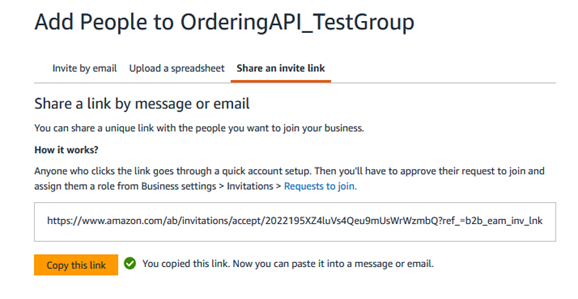
- Select Copy this link.
- Paste the link in the body of your email message.
Frequently asked questions
Q: Which region or country does Ordering APIsupports?
A: Ordering API supports all Amazon Business marketplace.
Q: What role to request for Ordering API?
A: The role to request for Ordering API is AmazonBusinessOrderPlacement.
Q: Is it required to add groups and users in my purchasing system before using the Ordering API?
A: Yes. The Purchase Order will reach Amazon Business when there’s an assigned group and users in the purchasing system.
Q: Do you have a sample response to share?
A: Yes. Here’s the sample response.
HTTP/1.1 200 OK
x-amzn-RequestId: ...
Content-Type: application/json
Content-Length: ...

{
  "lineItems": [
    {
      "externalId": "line-item-1",
      "acceptedItems": [
         {
          "quantity": 1,

          "artifacts": [
            {
              "acceptanceArtifactType": "DeliveryTimeRange",
              "lowerBoundary": "2023-01-01T08:00:00Z",
              "upperBoundary": "2023-01-02T07:59:59Z"
            },
            {
              "acceptanceArtifactType": "UnitPrice",
              "amount": {
                "currencyCode": "USD",
                "amount": 9.99
              }
            },
            {
              "acceptanceArtifactType": "Charge",
              "amount": {
                "currencyCode": "USD",
                "amount": 4.99
              },
              "category": "SHIPPING",
              "type": "PRINCIPAL"
            },
            {


              "acceptanceArtifactType": "Charge",
              "amount": {
                "currencyCode": "USD",
                "amount": 9.99
              },
              "category": "SUBTOTAL",
              "type": "PRINCIPAL"
            },
            {
              "acceptanceArtifactType": "OrderIdentifier",
              "identifier": "000-1111111-2222222"
            }
          ]
        }
      ],
 "rejectedItems": []
    }
  ],
  "acceptanceArtifacts": [
    {
      "acceptanceArtifactType": "Charge",
      "amount": {
        "currencyCode": "USD",
        "amount": 4.99
      },
      "category": "SHIPPING",
      "type": "PRINCIPAL"
    },
    {
      "acceptanceArtifactType": "Charge",

      "amount": {
        "currencyCode": "USD",
        "amount": 9.99
    },
      "category": "SUBTOTAL",
      "type": "PRINCIPAL"
    },
    {
      "acceptanceArtifactType": "Signed"
    }
  ],
  "rejectionArtifacts": []
}
Q: Does Ordering API return an error response for unsuccessful request?
A: Yes. If the request is unsuccessful, Ordering API returns an error response.
HTTP/1.1 400 Bad Request
x-amzn-RequestId: ...
Content-Type: application/json
Content-Length: ...

{
  "errors": [
    {
      "code": "INVALID_REQUEST_PARAMETER",
      "message": "The following required request parameter is missing: lineItems",
      "details": ""

    }
  ]
}
HTTP/1.1 403 Forbidden
x-amzn-RequestId: ...
Content-Type: application/json
Content-Length: ...

{
  "errors": [
    {
      "message": "The security token included in the request is invalid.",
      "code": "InvalidInput"
    }
  ]
}
Q: What features/functionalities are currently not supported with Ordering API?
A: The following features are not currently supported:
| Features | Description | Alternate option |
|---|---|---|
| Amazon Fresh Products | Highly perishable products such as groceries | Punchout Ordering |
| Gift cards | Physical and digital gift cards sold on Amazon Business. | Punchout Ordering with credit card |
| Digital products | Digital products sold on Amazon Business. | Punchout Ordering |
| Order Confirmation email | Order confirmation email sent to the customer after an order is placed. | Punchout Ordering and cXML Direct Ordering |
| Electronic Order Confirmation | Order confirmation sent to the customer in cXML or EDI format. | Punchout Ordering and cXML Direct Ordering |
| Electronic Advanced Shipment Notification | Advanced Shipment Notification sent to the customer in cXML or EDI format. | Punchout Ordering and cXML Direct Ordering |
| Adding Billing Address from Purchase Order (PO) to invoicing | Dynamically pull the BillTo field from the PO as opposed to the static value loaded when activating invoicing line of credit. This feature helps keep billing separate for entities dynamically. | Punchout Ordering and cXML Direct Ordering |
| Planned Delivery | Ability for customers to select a delivery date up to 90 days in advance. | Punchout Ordering |
| Scheduled Delivery | A delivery experience in which customers choose a specific delivery window from a calendar. | Punchout Ordering |
| Heavy/Bulky products support | Purchase of Heavy Bulky products. Product is considered Heavy/Bulky when weight exceeds 30Kg and/or its Girth (girth=Length+2*(Width+Height)) exceeds 300cm and/or its Length exceeds (150cm) | Punchout Ordering and cXML Direct Ordering |
| Free Pallet Delivery (FPD) | A free shipping benefit for all Business Prime members to get their pallet size purchases delivered in a single delivery on a pallet, either as soon as possible (3-7 days) or for a scheduled delivery. | Punchout Ordering and cXML Direct Ordering |
For information about Punchout Ordering, see Punchout - Purchasing System Integration. For information about cXML Direct Ordering, contact your Amazon Business customer advisor.
Appendices
Appendix 1: Amazon Business endpoints, store URLs, and store IDs
Appendix 2: Ordering API model and reference
Refer to Ordering API v1 model and Ordering API v1 reference.
Appendix 3: Ordering API rejection codes
Ordering API follows standard HTTP status codes. Generally, the API returns HTTP 400 status code for any missing inputs. If the API input is valid but the order cannot be fulfilled due to service issues or business logic reasons, then rejection codes are provided with HTTP 200 status code.
Below are the rejection codes provided with an HTTP 200 status code in response.
| rejection_message_code | rejection_message_code_desc | rejection_message_short | rejection_message_long |
|---|---|---|---|
| 000-001 | UNEXPECTED_ERROR | Unknown Error | Something went wrong on our side. We're sorry for the inconvenience. Please contact Amazon Business customer support. |
| 000-002 | UNEXPECTED_ERROR_CV | Unknown Error | Something went wrong on our side. We're sorry for the inconvenience. Please contact Amazon Business customer support. |
| 001-001 | UNSUPPORTED_ORDER_TYPE | cXML - Unsupported order type | You've updated an order that has been submitted to Amazon Business. Currently, Amazon Business doesn't support updates to an existing order. We're working to include this capability in the future. Please place a new purchase order. To cancel an existing order, contact Amazon Business customer support. |
| 001-012 | NO_ITEMS_REMAINING | All line items in your order were individually rejected. | |
| 002-002 | CREDENTIALS_NOT_VALIDATED | Missing or invalid credentials | Your order has invalid credentials. Your eProcurement system transmits an invalid 'from identity' or 'shared secret' in credentials. Please ask your IT support team or Amazon Business account admin to provide a valid 'from identity' and 'shared secret' in /cXML/Header/From/Credential/Identity. |
| 003-001 | ADDRESS_NOT_PRESENT | Missing address data | The address is missing. Your eProcurement system didn't transmit ${Address}. Please ask your IT support team or Amazon Business account admin to provide ${Address} in {XPATH}. |
| 003-002 | ADDRESS_ELEMENT_MISSING | Address element missing | A required address element is missing. Please provide complete address information. |
| 003-003 | ADDRESS_NAME_MISSING | Address name missing | The address name field is missing. Please provide an address name. |
| 003-004 | ADDRESS_NAME_INVALID | Address name invalid | The address name contains invalid characters. Please provide a valid address name. |
| 003-005 | ADDRESS_NAME_MULTIBYTE | Address name multibyte | The address name contains multibyte characters that are not supported. Please use standard characters. |
| 003-006 | POSTAL_ADDRESS_MISSING | Postal address missing | The postal address is missing. Please provide complete postal address information. |
| 003-007 | POSTAL_ADDRESS_NAME_MISSING | Postal address name missing | The postal address name is missing. Please provide a postal address name. |
| 003-008 | POSTAL_ADDRESS_NAME_INVALID | Postal address name invalid | The postal address name is invalid. Please provide a valid postal address name. |
| 003-009 | DELIVER_TO_MISSING | Deliver-to name missing | The deliver-to name is missing. Please provide the recipient name. |
| 003-010 | DELIVER_TO_MULTIBYTE | Deliver-to multibyte | The deliver-to name contains unsupported multibyte characters. Please use standard characters. |
| 003-011 | DELIVER_TO_INVALID | Deliver-to invalid | The deliver-to name is invalid. Please provide a valid recipient name. |
| 003-012 | STREET_ELEMENT_MISSING | Street element missing | The street element is missing from the address. Please provide street information. |
| 003-013 | STREET_LINE1_MISSING | Street line 1 missing | Street address line 1 is missing. Please provide the primary street address. |
| 003-014 | STREET_LINE1_MULTIBYTE | Street line 1 multibyte | Street line 1 contains unsupported multibyte characters. Please use standard characters. |
| 003-015 | STREET_LINE1_INVALID | Street line 1 invalid | Street address line 1 is invalid. Please provide a valid street address. |
| 003-016 | STREET_LINE1_MISSING_JP | Street line 1 missing (JP) | Street address line 1 is missing (Japan marketplace). Please provide the street address. |
| 003-017 | STREET_LINE1_MULTIBYTE_JP | Street line 1 multibyte (JP) | Street line 1 contains invalid multibyte characters (Japan marketplace). |
| 003-018 | STREET_LINE1_INVALID_JP | Street line 1 invalid (JP) | Street address line 1 is invalid (Japan marketplace). Please provide a valid street address. |
| 003-019 | STREET_LINE2_MISSING | Street line 2 missing | Street address line 2 is missing. Please provide street line 2 if required. |
| 003-020 | STREET_LINE2_MULTIBYTE | Street line 2 multibyte | Street line 2 contains unsupported multibyte characters. Please use standard characters. |
| 003-021 | STREET_LINE2_INVALID | Street line 2 invalid | Street address line 2 is invalid. Please provide a valid street address line 2. |
| 003-022 | STREET_LINE3_MISSING | Street line 3 missing | Street address line 3 is missing. Please provide street line 3 if required. |
| 003-023 | STREET_LINE3_MULTIBYTE | Street line 3 multibyte | Street line 3 contains unsupported multibyte characters. Please use standard characters. |
| 003-024 | STREET_LINE3_INVALID | Street line 3 invalid | Street address line 3 is invalid. Please provide a valid street address line 3. |
| 003-025 | CITY_ELEMENT_MISSING | City element missing | The city element is missing from the address. Please provide city information. |
| 003-026 | CITY_ELEMENT_EMPTY | City element empty | The city field is empty. Please provide a city name. |
| 003-027 | CITY_INVALID | City invalid | The city name is invalid. Please provide a valid city name. |
| 003-028 | CITY_MULTIBYTE | City multibyte | The city name contains unsupported multibyte characters. Please use standard characters. |
| 003-029 | STATE_MISSING | State missing | The state or region is missing from the address. Please provide state/region information. |
| 003-030 | STATE_MULTIBYTE | State multibyte | The state or region contains unsupported multibyte characters. Please use standard characters. |
| 003-031 | STATE_INVALID | Invalid state in address | |
| 003-032 | POSTALCODE_MISSING | Postal code missing | The postal code is missing from the address. Please provide a postal code. |
| 003-033 | POSTALCODE_MULTIBYTE | Postal code multibyte | The postal code contains unsupported multibyte characters. Please use standard characters. |
| 003-034 | POSTALCODE_INVALID | Invalid postal code format | |
| 003-035 | COUNTRY_ELEMENT_MISSING | Country element missing | The country element is missing from the address. Please provide country information. |
| 003-036 | ISO_COUNTRY_CODE_MISSING | ISO country code missing | The ISO country code is missing. Please provide a valid 2-letter ISO country code. |
| 003-037 | ISO_COUNTRY_CODE_LENGTH_EXCEEDED | ISO country code length exceeded | The ISO country code exceeds the maximum length. Please use a 2-letter ISO country code. |
| 003-038 | ISO_COUNTRY_CODE_INVALID | ISO country code invalid | The ISO country code is invalid. Please provide a valid 2-letter ISO country code. |
| 003-039 | EMAIL_ADDRESS_INVALID | Email address invalid | The email address format is invalid. Please provide a valid email address. |
| 003-040 | EMAIL_NAME_INVALID | Email name invalid | The email display name is invalid. Please provide a valid email name. |
| 003-041 | EMAIL_ADDRESS_MISSING | Email address missing | The email address is missing. Please provide an email address. |
| 003-042 | EMAIL_NAME_MISSING | Email name missing | The email display name is missing. Please provide an email name. |
| 003-043 | TELEPHONE_NUMBER_MISSING | Telephone number missing | The telephone number is missing. Please provide a phone number. |
| 003-044 | AREA_OR_CITYCODE_MISSING | Area or city code missing | The area code or city code is missing from the phone number. Please provide complete phone number. |
| 003-045 | NUMBER_MISSING | Phone number missing | The phone number is missing. Please provide a valid phone number. |
| 003-046 | NUMBER_EMPTY | Phone number empty | The phone number field is empty. Please provide a phone number. |
| 003-047 | NUMBER_INVALID | Phone number invalid | The phone number format is invalid. Please provide a valid phone number. |
| 003-048 | NUMBER_NON_NUMERIC | Phone number non-numeric | The phone number contains non-numeric characters. Please provide only numeric digits. |
| 003-049 | NUMBER_INSUFFICIENT_CHARACTERS | Phone number insufficient characters | The phone number is too short. Please provide a complete phone number. |
| 003-050 | PHONE_NUMBER_NAME_INVALID | Phone number name invalid | The phone number label/name is invalid. Please provide a valid label. |
| 003-051 | PHONE_NUMBER_NAME_MISSING | Phone number name missing | The phone number label/name is missing. Please provide a label for the phone number. |
| 003-900 | UNAUTHORIZED_ADDRESS | Unauthorized address | You are not authorized to use this address. Please select an address you have permission to use. |
| 003-052 | ADDRESS_INVALID | Invalid address data | Your order has invalid information. Your eProcurement system transmits an invalid ${Address}. Please ask your IT support team or Amazon Business account admin to provide a valid address in ${Address}. |
| 004-001 | PAYMENT_PLAN_NOT_FOUND | Missing default payment method | Your group has an active 'shared payment' settings, but the default payment method requires configuration. Please ask your IT support team or Amazon Business account admin to configure the default payment method. Follow these steps: 1. Sign in to your Amazon Business account. 2. Go to Account Details > Business Settings. 3. In Business Settings, navigate to Billing and Shipping > Payment Methods. |
| 004-002 | INACTIVE_INSTRUMENT_BILLING_ADDRESS | Invalid billing address | The billing address associated with your payment method is invalid. Please update the billing address or select a different payment method. |
| 004-003 | INACTIVE_INSTRUMENT | Inactive payment method | Your payment method is inactive or invalid. Please add a valid payment method. Follow these steps: 1. Sign in to your Amazon Business account. 2. Go to Account Details > Account settings. If your group uses a 'shared' payment method, please contact your IT support team or Amazon Business account admin. |
| 004-004 | PAYMENT_METHOD_MISMATCH | Payment method mismatch | The payment setting for your group was changed from 'shared pay' to 'individual pay' after checkout. For this reason, we can't find a valid payment method in your purchase order. Please choose a valid payment option at checkout. |
| 004-005 | PAYMENT_INSTRUMENT_EXPIRED | Expired payment instrument | Your payment method has expired. Please choose another payment method or add a new payment method. |
| 004-006 | INSUFFICIENT_COVERAGE_UNKNOWN_PAYMENT_PLAN | Insufficient coverage unknown payment plan | There is insufficient coverage for an unknown payment plan. Please contact Amazon Business customer support. |
| 004-007 | INVALID_CARD_SECURITY_CODE | Invalid card security code | The card security code (CVV) is invalid. Please verify the security code. |
| 004-008 | INCOMPATIBLE_PAYMENT_PLANS | Incompatible payment plans | The selected payment plans are incompatible. Please choose compatible payment methods. |
| 004-009 | FRAUD_DENIED | Payment denied due to fraud check | The payment was denied due to fraud prevention measures. Please contact Amazon Business customer support. |
| 004-010 | ELIGIBILITY_FAULT_INSUFFICIENT_COVERAGE | Insufficient credit limit | There's an insufficient balance in your Pay by Invoice credit line. Please ask your IT support team or Amazon Business account admin to clear pending invoices. |
| 004-011 | ELIGIBILITY_FAULT_CURRENCY_NOT_SUPPORTED | Currency mismatch | The currency in your payment method does not match the order currency. Please use a payment method with matching currency. |
| 004-012 | ELIGIBILITY_FAULT_MARKET_PLACE_NOT_SUPPORTED | Marketplace mismatch | The payment method is not supported in this marketplace. Please use a payment method valid for this marketplace. |
| 004-013 | ELIGIBILITY_FAULT_INELIGIBLE_PRODUCT_FOR_PROCESSOR | PBI not supported | Your order contains an item that isn't supported by fulfillment through Pay by Invoice payment method. Please choose another payment method. |
| 004-014 | ELIGIBILITY_FAULT_PAYMENT_METHOD_INACTIVE | Inactive payment method | The Pay by Invoice (PBI) payment method is inactive for your account. Please choose another payment method. Another option is to ask your IT support team or Amazon Business account admin to activate the PBI payment method. |
| 004-015 | ELIGIBILITY_FAULT_UNSUPPORTED_PAYMENT_OPTION_FOR_NON_IBA_PRODUCT | PBI not supported for fulfilment | Your order contains item(s) that can't be purchased using 'Pay by Invoice' payment method. Please choose another payment method. |
| 004-016 | ELIGIBILITY_FAULT_UNSUPPORTED_PAYMENT_METHOD | Unsupported payment method | Your order contains item(s) that can't be purchased using the selected payment method. Please choose another payment method. |
| 004-017 | RETRYABLE_PAYMENT_ERROR | An internal error has occurred while validating your payment instrument. You may retry this request at a later time. | |
| 004-018 | PAYMENT_METHOD_OUT_OF_SYNC | Missing default payment method | The default payment plan for your group has been deleted. Please ask your IT support team or Amazon Business account admin to add a default payment plan. |
| 004-019 | INSUFFICIENT_BUDGET_FUNDS | The budget used to complete this purchase has insufficient funds | The budget has insufficient funds. Please select a different budget or add funds to the current budget. |
| 004-020 | INVALID_BUDGET | The budget selected for this purchase is not valid | The budget is not valid. Please select a valid budget. |
| 005-001 | INACTIVE_GROUP | Your group is not enabled for purchasing | Your group is not enabled for purchasing. Please ask your IT support team or Amazon Business account admin to enable purchasing for your group. |
| 006-003 | MULTIPLE_ACCOUNTS_ASSOCIATED | Buyer email linked to multiple accounts | Your email ID is linked to multiple Amazon Business accounts. Amazon Business allows only one email ID for each Amazon Business account. Please link only one email ID. Need more help? Contact Amazon Business customer support. |
| 007-001 | INCOMPLETE_SHIPPING_INPUT | Slot not available for scheduled delivery | The requested scheduled delivery slot is not available. Please select a different delivery time or use standard delivery. |
| 007-003 | SHIPPING_CROSS_BORDER_EXPORT | Shipping export restrictions | We can't ship this order to your selected delivery location. There's a regulatory or export restriction. Please select a different shipping address. |
| 007-004 | INVALID_CUSTOMER_NAME | Invalid customer name | The customer name is invalid. Please provide a valid customer name in the shipping information. |
| 007-005 | DELIVERY_INFORMATION_MISSING | Delivery information missing | Required delivery information is missing. Please provide complete delivery details. |
| 007-006 | DESTINATION_INFORMATION_MISSING | Destination information missing | Destination information is missing. Please provide complete destination details. |
| 007-007 | NO_DELIVERY_OPTION | No ship option available | We can't fulfill this order because there's no shipping option available at your specified location. Please select a different delivery location. |
| 007-008 | SHIPPING_ENGINE_INVALID_INPUT | Internal systems issue | Something went wrong on our side. We can't find the shipping information. Please contact Amazon Business customer support. |
| 007-009 | SHIPPING_RESTRICTED | Internal systems issue | Something went wrong on our side. We can't find the shipping information. Please contact Amazon Business customer support. |
| 007-010 | INVALID_SELECTED_DELIVERY_OPTION_FOR_LINE_ITEM | Internal systems issue | Something went wrong on our side. We can't find a valid ship option. Please contact Amazon Business customer support. |
| 007-011 | INVALID_SHIPPING_ADDRESS | Invalid shipping address | The shipping address is invalid. Please provide a valid shipping address. |
| 007-012 | KYC_DOCUMENT_UPLOAD_REQUIRED | Missing KYC document | This item requires cross-country shipping and a valid KYC document. Please upload a valid KYC documents in 'Your Orders' page. Need more help? Contact Amazon Business customer support. |
| 007-013 | DELIVERY_OPTION_INVALID | Unsupported - Scheduled Delivery | Something went wrong on our side. This item requires scheduled delivery, which isn't supported at this time. Please contact Amazon Business customer support. |
| 007-014 | OFFER_UNBUYABLE_CUSTOMER_CONTEXT | Offer unavailable | Your order contains an offer that isn't available at your specified location. Please select a different item or offer. |
| 007-015 | DELIVERY_EXACTLY_ON_NO_SUPPORTED_SHIP_OPTION_AVAILABLE | Delivery exactly on - no option available | No shipping option is available for the exact delivery date requested. Please select a different delivery date or use standard delivery. |
| 007-016 | DELIVERY_DATE_NOT_ON_SAME_DAY_AS_REQUESTED_DATE | Delivery date not on same day as requested | The available delivery date does not match the requested date. Please adjust your delivery date expectations. |
| 008-001 | ORDER_TOTAL_PRICE_CHANGED_MORE_THAN_ALLOWED_SAFEGUARD | Tolerance - Order total | The 'order total' exceeds the safeguard limit set by your organization. Delaying the submission of the purchase order (PO) or adding items to cart after checkout might cause large price changes. We recommend you to share the PO immediately and not add items to the cart after checkout. |
| 008-002 | SHIPPING_PRICE_CHANGED_MORE_THAN_ALLOWED_SAFEGUARD | Tolerance - Shipping fee | The 'shipping fee' exceeds the safeguard limit set by your organization. Delaying the submission of the purchase order (PO) might cause changes in shipping fee. We recommend you to share the PO immediately after checkout. |
| 008-003 | LINE_ITEM_SUBTOTAL_PRICE_CHANGED_MORE_THAN_ALLOWED_SAFEGUARD | Tolerance - Item subtotal | The 'item subtotal' exceeds the safeguard limit set by your organization. Delaying the submission of the purchase order (PO) or adding items to cart after checkout might cause large price changes. We recommend you to share the PO immediately and not add items to the cart after checkout. |
| 008-004 | DELIVERY_DATE_AFTER_EXPECTED_DATE | Tolerance - Delivery time | The order will not reach you within the delivery time limit set by your organization. Delaying the submission of purchase order (PO) might delay the delivery. We recommend you to share the PO immediately after checkout. |
| 008-005 | UNIT_PRICE_PREDICATE_VIOLATION | Tolerance - Unit price | The 'unit price' exceeds the safeguard limit set by your organization. Delaying the submission of the purchase order (PO) or adding items to cart after checkout might cause large price changes. We recommend you to share the PO immediately and not add items to the cart after checkout. |
| 008-006 | FBA_PREDICATE_VIOLATION | Tolerance - Non FBA | Your order contains an item that isn't Fulfilled by Amazon. Your organization only allows items that are Fulfilled by Amazon. Please select an item that is Fulfilled by Amazon. |
| 008-007 | QUANTITY_PREDICATE_VIOLATION | Tolerance - Insufficient stock | The seller's stock isn't enough to meet your requested quantity. Your organization only allows purchases if the requested quantity is available. Please reduce the quantity or choose another seller. |
| 008-008 | OFFER_NOT_PROVIDED | Tolerance - item not available | Your order contains an item that is currently unavailable and we can't find a suitable replacement. Please select another item. |
| 008-009 | OFFER_UNAVAILABLE | Offer unavailable | Your order contains an offer that is unavailable. Please select a different item or offer. |
| 008-010 | CONDITION_PREDICATE_VIOLATION | Condition predicate violation | The item condition does not meet your organization's safeguard requirements. Please select an item with an acceptable condition. |
| 008-011 | ORDER_CANCELLED_SAFEGUARD | Your order was canceled because your organization's safeguards do not allow purchasing if there is a problem with a line item | Your organization's safeguards require all line items to be valid. Since one or more items were rejected, the entire order was cancelled. Please resolve the line item issues or adjust your safeguard settings. |
| 009-001 | OFFER_NOT_ALLOWED_BY_CURATION | Item or seller is blocked | The item or the seller is blocked by your organization. Please select a different item and seller. |
| 009-007 | PROHIBITED_ITEM | Item is prohibited for purchase | |
| 010-001 | CUSTOMIZABLE_UNSUPPORTED | Unsupported - Customizable items | You've tried to purchase a customized item that is only available through enhanced checkout feature in Punchout. Currently, enhanced checkout is inactive for your account. We recommend you to activate the enhanced checkout feature. Please contact your Amazon Business account admin or Amazon Business customer support. |
| 010-002 | AT_HOME_SERVICE_UNSUPPORTED | Unsupported - Amazon Home Services | You've tried to purchase an Amazon Home Services item that is only available through enhanced checkout feature in Punchout. Currently, enhanced checkout is inactive for your account. We recommend you to activate the enhanced checkout feature. Please contact your Amazon Business account admin or Amazon Business customer support. |
| 010-003 | DIGITAL_UNSUPPORTED | Unsupported - Digital items | You've tried to purchase a digital item that is only available through enhanced checkout feature in Punchout. Currently, enhanced checkout is inactive for your account. We recommend you to activate the enhanced checkout feature. Please contact your Amazon Business account admin or Amazon Business customer support. |
| 010-004 | E_GIFT_CARD_NOT_SUPPORTED | Unsupported - eGift cards | You've tried to purchase an eGift card that is only available through enhanced checkout feature in Punchout. Currently, enhanced checkout is inactive for your account. We recommend you to activate the enhanced checkout feature. Please contact your Amazon Business account admin or Amazon Business customer support. |
| 010-005 | MAGAZINE_WITH_PBI_NOT_SUPPORTED | Unsupported - Magazines | You've tried to purchase a magazine that is only available through enhanced checkout feature in Punchout. Currently, enhanced checkout is inactive for your account. We recommend you to activate the enhanced checkout feature. Please contact your Amazon Business account admin or Amazon Business customer support. |
| 010-006 | BUNDLES_UNSUPPORTED | Unsupported - Bundles | You've tried to purchase a magazine that is only available through enhanced checkout feature in Punchout. Currently, enhanced checkout is inactive for your account. We recommend you to activate the enhanced checkout feature. Please contact your Amazon Business account admin or Amazon Business customer support. |
| 010-007 | WHOLE_FOODS_UNSUPPORTED | Unsupported - Food Item | You've tried to purchase a magazine that is only available through enhanced checkout feature in Punchout. Currently, enhanced checkout is inactive for your account. We recommend you to activate the enhanced checkout feature. Please contact your Amazon Business account admin or Amazon Business customer support. |
| 010-008 | PHARMACY_UNSUPPORTED | Unsupported - Pharmacy | You've tried to purchase a magazine that is only available through enhanced checkout feature in Punchout. Currently, enhanced checkout is inactive for your account. We recommend you to activate the enhanced checkout feature. Please contact your Amazon Business account admin or Amazon Business customer support. |
| 011-001 | INVALID_UNITPRICE_CURRENCY | Invalid unit price currency | The currency code in the unit price is invalid. Please provide a valid currency code. |
| 011-002 | INVALID_UNITPRICE_AMOUNT | Invalid unit price amount | The unit price amount is invalid. Please provide a valid numeric amount. |
| 011-003 | INVALID_TAX_CURRENCY | Invalid tax currency | The currency code in the tax amount is invalid. Please provide a valid currency code. |
| 011-004 | INVALID_TAX_AMOUNT | Invalid tax amount | The tax amount is invalid. Please provide a valid numeric amount. |
| 011-005 | INVALID_SHIPPING_CURRENCY | Invalid shipping currency | The currency code in the shipping amount is invalid. Please provide a valid currency code. |
| 011-006 | INVALID_SHIPPING_AMOUNT | Invalid shipping amount | The shipping amount is invalid. Please provide a valid numeric amount. |
| 011-007 | INVALID_CHARGE_CURRENCY | Invalid charge currency | The currency code in the charge is invalid. Please provide a valid currency code. |
| 011-008 | INVALID_CHARGE_AMOUNT | Invalid charge amount | The charge amount is invalid. Please provide a valid numeric amount. |
| 011-009 | INVALID_CURRENCY | Invalid currency | The currency code is invalid. Please provide a valid ISO currency code. |
| 011-010 | INVALID_AMOUNT | Invalid amount | The amount is invalid. Please provide a valid numeric amount. |
| 011-011 | CURRENCY_MISMATCH | Currency mismatch | The currencies in your order do not match. Please ensure all amounts use the same currency code. |
| 012-001 | INVALID_BUSINESS_IDENTIFICATION_XPATH | Invalid business identification xpath | The business identification xpath is invalid. Please provide a valid xpath for business identification. |
| 012-002 | BUSINESS_ID_NOT_FOUND | Business ID not found | The specified business ID was not found. Please verify the business ID is correct. |
| 012-003 | MLE_IDENTIFIED_GROUP_IN_SELF_PAY | MLE identified group in self pay | The multi-legal entity group is configured for self-pay. Please use the appropriate payment configuration. |
| 014-001 | ACCOUNTING_ERROR | Accounting error | An accounting error occurred. Please contact Amazon Business customer support. |
| 014-900 | BLANKET_PO_NUMBER_NOT_FOUND | Blanket PO number not found | The blanket purchase order number was not found. Please verify the blanket PO number is correct. |
| 014-901 | DISTRIBUTIONS_CONFIG_NOT_FOUND | Distributions config not found | The distributions configuration was not found. Please verify your distributions setup. |
| 015-001 | ORDERING_UNIT_LIMIT_EXCEEDED | Exceeds order limit or line item quantity | You order contains more than 50 items or 999 item quantity. Amazon Business allows a maximum of 50 items or 999 item quantity per purchase order. Please ask you IT support team or Amazon Business account admin to create multiple POs to split the items and item quantity. Limit the total items to 50 and total item quantity to 999 for each PO. |
| 015-002 | GIFT_CARD_LIMIT | This item was rejected because of an invalid custom gift card value | The custom gift card value is invalid. Please provide a value within the acceptable range for this gift card. |
| 015-003 | QUANTITY_LIMITS_EXCEEDED | Exceeds temporary item quantity limit | Your order exceeds the temporary quantity limit for this item. Please reorder after some time. |
| 015-004 | MINIMUM_QUANTITY_LIMITS_NOT_REACHED | Minimum order quantity not met | Your order quantity is below the minimum order quantity of {MinimumQuantity}. Please place a new order with a minimum quantity of {MinimumQuantity}. |
| 015-005 | ITEM_QUANTITY_NOT_AVAILABLE | Insufficient stock | Situation 1 (If we can get information on stock availability): We can't fulfill your order due to shortage of stock for this item. We only have {availableQuantity} in stock. Please reduce the item quantity to {availableQuantity} or lesser. Situation 2 (If we can't get information on stock availability): We can't fulfill your order due to shortage of stock for this item. We're trying to get information on stock availability. In the meantime, please choose another similar item. |
| 015-006 | MINIMUM_PURCHASE_THRESHOLD_NOT_REACHED | Minimum purchase amount not met | Your order is below the required minimum purchase amount of $25. Please place a new order with a total cart value of $25 or more. |
| 015-007 | TOTAL_QUANTITY_EXCEED_LIMIT | Total quantity limit exceeded | The total quantity across all items in your order exceeds the allowed limit. Please reduce the total quantity. |
| 016-001 | GROUP_ALLOWED_ONLY_PUNCHOUT | Group allowed only punchout | This group is configured for punchout ordering only. Please use punchout to place orders. |
| 016-002 | DELIVERY_EXACTLY_ON_VALIDATION_MULTIPLE_DELIVERY_DATES | Multiple delivery dates provided | Multiple delivery dates were provided. Please specify only one delivery date. |
| 016-003 | DELIVERY_EXACTLY_ON_VALIDATION_DELIVERY_DATE_IN_THE_PAST | Delivery date in the past | The requested delivery date is in the past. Please provide a future delivery date. |
| 016-004 | DELIVERY_EXACTLY_ON_VALIDATION_DELIVERY_DATE_AFTER_LIMIT | Delivery date after limit | The requested delivery date is too far in the future. Please select a date within the allowed range. |
| 016-005 | INVALID_RFQ_MESSAGE_IDENTIFIER | Invalid RFQ message identifier | The RFQ (Request for Quote) message identifier is invalid. Please provide a valid RFQ identifier. |
| 016-900 | MALFORMED_BUYER_ID | Malformed buyer ID | The buyer ID format is invalid. Please provide a valid buyer ID. |
| 016-901 | CUSTOMER_ID_MISSING | Customer ID missing | The customer ID is missing from the request. Please include a valid customer ID. |
| 016-902 | MISSING_BUYER_REF | Missing buyer reference | The buyer reference is missing. Please include a buyer reference in your request. |
| 016-903 | BAD_EXTERNAL_GROUP_ID | Bad external group ID | The external group ID is invalid. Please provide a valid group ID. |
| 016-904 | GROUP_NOT_IN_PARTY | Group not in party | The specified group does not belong to the party. Please verify the group ID. |
| 016-905 | GROUP_NOT_PUBLIC | Group not public | The group is not public. Please use a public group or configure group visibility. |
| 016-907 | BUYING_GROUP_DETAIL_MISSING | Buying group detail missing | Buying group details are missing from the request. Please include buying group information. |
| 016-908 | MISSING_GROUP_REF | Missing group reference | The group reference is missing. Please include a group reference in your request. |
| 016-909 | ADDRESS_ID_CUSTOMER_ID_MISMATCH | Address ID customer ID mismatch | The address ID does not match the customer ID. Please use an address that belongs to the customer. |
| 016-910 | MALFORMED_LEGAL_ENTITY_ID | Malformed legal entity ID | The legal entity ID format is invalid. Please provide a valid legal entity ID. |
| 016-911 | MLE_STRATEGY_CONFIG_NOT_EXISTS | MLE strategy config does not exist | The multi-legal entity strategy configuration does not exist. Please configure MLE strategy. |
| 016-912 | MATCHING_MLE_GROUP_NOT_PRESENT | Matching MLE group not present | No matching multi-legal entity group was found. Please verify your MLE configuration. |
| 016-913 | NO_MATCHING_AUXILIARY_KEY_FOUND | No matching auxiliary key found | No matching auxiliary key was found for multi-legal entity routing. Please verify your MLE setup. |
| 016-914 | DUPLICATE_ORDER_REQUEST_API | Duplicate order request API | This order request is a duplicate. Please use a unique external ID for each order. |
| 016-915 | BOTH_PENDING_ORDER_AND_PENDING_LINE_ITEM_REFERENCE_RECEIVED | Both pending order and line item reference received | Both pending order reference and pending line item reference were provided. Please provide only one. |
| 016-916 | INVALID_PENDING_LINE_ITEM_REFERENCE_RECEIVED | Invalid pending line item reference | The pending line item reference is invalid. Please provide a valid reference. |
| 016-917 | PENDING_LINE_ITEM_REFERENCE_FROM_MULTIPLE_PURCHASE_RECEIVED | Pending line item references from multiple purchases | Pending line item references from multiple purchases were provided. Please reference items from a single purchase. |
| 016-918 | INVALID_PENDING_ORDER_REFERENCE_RECEIVED | Invalid pending order reference | The pending order reference is invalid. Please provide a valid pending order reference. |
| 016-919 | INVALID_PURCHASE_ORDER_NUMBER | Invalid purchase order number | The purchase order number format is invalid. Please provide a valid PO number. |
| 016-920 | INVALID_PAYMENT_METHOD | Invalid payment method | The payment method in the request is invalid. Please provide a valid payment method. |
| 016-921 | REQUESTED_DELIVERY_DATE_BEFORE_CURRENT_DATE | Requested delivery date before current date | The requested delivery date is before the current date. Please provide a future delivery date. |
| 016-922 | PENDING_REFERENCE_MISSING | Pending reference missing | A pending reference is required but missing. Please include a pending order or line item reference. |
| 016-923 | MISSING_MARKETPLACE | Missing marketplace | The marketplace is missing from the request. Please include a valid marketplace. |
| 016-924 | MISSING_USER_REF | Missing user reference | The user reference is missing. Please include a user reference in your request. |
| 016-925 | UNSUPPORTED_MARKETPLACE | Unsupported marketplace | The specified marketplace is not supported. Please use a supported marketplace. |
| 016-926 | DUPLICATE_LINE_ITEM_EXTERNAL_ID | Duplicate line item external ID | Duplicate line item external IDs were found. Please use unique external IDs for each line item. |
| 016-927 | MLE_AUXILIARY | MLE auxiliary | A multi-legal entity auxiliary error occurred. Please verify your MLE configuration. |
| 016-998 | UNAUTHORIZED | Unauthorized | You are not authorized to perform this action. Please verify your permissions. |
| 016-999 | INVALID_REQUEST | Invalid request | The request is invalid. Please verify your request format and parameters. |
| 017-001 | EPROC_DISABLED | eProcurement disabled | eProcurement is disabled for your group. Please contact your IT support team or Amazon Business account admin to enable eProcurement. |
| 018-001 | GROUP_NOT_CONFIGURED_FOR_CHECKOUT | Checkout broken - Group not configured for checkout | Enhanced checkout isn't activated for your group. Please ask your IT support team or Amazon Business account admin to activate the enhanced checkout for group ID: {groupId}. |
| 018-002 | APPROVAL_WINDOW_EXPIRED | Pending order is expired | The pending order approval window has expired. Please create a new order. |
| 018-003 | DUPLICATE_ORDER_REQUEST | Pending order is approved | The pending order has already been approved. No further action is needed. |
| 018-004 | ORDER_CANCELLED | Pending order is cancelled | The pending order has been cancelled. Please create a new order if needed. |
| 018-005 | ORDER_CONTAINS_MULTIPLE_SESSION_ITEMS | Order contains multiple session items | The order contains items from multiple sessions. Please separate into individual orders. |
| 018-006 | ORDER_ITEM_COUNT_GREATER_THAN_PURCHASE | Order item count greater than pending order item count | The order has more items than the pending order. Please match the pending order item count. |
| 018-007 | ORDER_ITEM_COUNT_LESS_THAN_PURCHASE | Order item count less than pending order item count | The order has fewer items than the pending order. Please include all pending order items. |
| 018-008 | ORDER_ITEM_ASIN_NOT_SAME_AS_PURCHASE_ITEM | Order item asin not same as pending order item | The item ASIN does not match the pending order. Please use the correct ASIN from the pending order. |
| 018-009 | ORDER_ITEM_QUANTITY_NOT_SAME_AS_PURCHASE_ITEM | Order item quantity not same as pending order quantity | The item quantity does not match the pending order. Please use the correct quantity from the pending order. |
| 018-010 | ORDER_LINE_ITEM_TOTAL_LESS_THAN_PURCHASE_LINE_ITEM_TOTAL | Order total not same as pending order total | The order total does not match the pending order total. Please verify the order matches the pending order. |
| 018-011 | PO_MARKETPLACE_DIFFERENT_FROM_PUNCHOUT | PO marketplace different from punchout | The purchase order marketplace differs from the punchout marketplace. Please use the same marketplace. |
| 018-012 | GROUP_NOT_CONFIGURED_FOR_CHECKOUT_IN_TEST_MODE | Group not configured for checkout in test mode | The group is not configured for checkout in test mode. Please configure test mode or switch to active mode. |
| 018-013 | SCENARIO_NOT_SUPPORTED_FOR_CHECKOUT | Order buyer not same as pending order buyer | The buyer does not match the pending order buyer. Please use the correct buyer from the pending order. |
| 020-001 | CONSUMER_ONLY_ITEM_USED_BY_BUSINESS_CUSTOMER | Consumer only item | This item is not available for purchase by Amazon Business customers. Please choose a different item. |
| 020-002 | K12_LICENSE_MISSING | Eligibility - K12 license missing | This item requires K12 credential. Please contact your IT support team or your Amazon Business account admin to access your organization's K12 credential. Access the credential by following these steps: 1. Sign in to Amazon Business. 2. Go to Account Details > Business Settings. 3. In Business Settings, navigate to Certifications > Licenses and Credentials. |
| 020-003 | PANASONIC_IT_VAR_LICENSE_MISSING | Eligibility - Panasonic IT-VAR reseller license missing | This item requires a Panasonic IT-VAR reseller license. Please contact your IT support team or your Amazon Business account admin to access your organization's Panasonic IT-VAR reseller license. Access the license by following these steps: 1. Sign in to Amazon Business. 2. Go to Account Details > Business Settings. 3. In Business Settings, navigate to Certifications > Licenses and Credentials. |
| 020-004 | PROFESSIONAL_BEAUTY_LICENSE_MISSING | Eligibility - Beauty license missing | This item requires a beauty license. Please contact your IT support team or your Amazon Business account admin to access your organization's beauty license. Access the license by following these steps: 1. Sign in to Amazon Business. 2. Go to Account Details > Business Settings. 3. In Business Settings, navigate to Certifications > Licenses and Credentials. |
| 020-005 | BUSINESS_OFFER_USED_BY_NON_BUSINESS_CUSTOMER | Eligibility - Item for B2B purchase only | This item or offer is only available for purchase by Amazon Business customers. Please choose a different item or create an Amazon Business account. |
| 020-006 | COMMERCIAL_ADDRESS_REQUIRED_FOR_DELIVERY | Eligibility - Shipment to commercial address only | This item is for shipping only to a commercial address. You've provided a residential shipping address. Please provide a commercial shipping address. |
| 020-007 | BUSINESS_ONLY_RESTRICTED_ITEM_CAN_NOT_SHIP_TO_STATE | Eligibility - Shipping restrictions | The seller can't ship the item to the requested state because of the shipping restrictions. Please select another seller or choose a different item. |
| 020-008 | BUSINESS_ONLY_RESTRICTED_ITEM_LICENCE_ADDRESS_MISMATCH | Eligibility - Shipping address mismatch in license | This item is available for purchase with a valid license. Your shipping address didn't match the address associated with the license. Please provide a valid license and associated shipping address. |
| 020-009 | BUSINESS_ONLY_RESTRICTED_ITEM_LICENSE_EXPIRED | Eligibility - Healthcare license expired | This item is available for purchase with a valid healthcare license. Your healthcare license has expired. Please renew your license or add a new license. |
| 020-010 | BUSINESS_ONLY_RESTRICTED_ITEM_LICENCE_STATE_MISMATCH | Eligibility - Shipping address mismatch in license | The 'state' mentioned in the shipping address and the 'state' mentioned in your healthcare license don't match. Please update the 'state' in the shipping address to match the 'state' in your license. |
| 020-011 | US_ARMY_LICENSE_MISSING | Eligibility - Allowed for purchase by US army only | This item is only available for purchase by the US Army. If you are a US Army personnel, please use approved credentials. If you aren't in the US Army, please choose a different item. |
| 020-012 | HEALTHCARE_LICENSE_MISSING | Eligibility - Healthcare license missing | This item is available for purchase with a valid healthcare license. Your healthcare license has expired. Please renew your license or add a new license. |
| 020-013 | SPECIFIC_GROUP_LICENSE_MISSING | Eligibility - Group not eligible for purchasing | This item is not available for purchase with your credentials. Please choose a different item. |
| 020-014 | CUSTOMER_NOT_ELIGIBLE | Eligibility - Customer not eligible for purchasing | This item is only available for purchase under an 'Invite Program'. Please choose a different item. |
| 020-015 | PROGRAM_NOT_ELIGIBLE | Eligibility - Group not eligible for purchasing | This item is not available for purchase by your group. Please choose a different item. |
| 021-001 | BUNDLE_COMP_QUANTITY_INVALID | Bundles - Multiple quantities not supported | You've tried to order multiple quantities for a bundled item. Currently, Amazon Business only allows 1 quantity for this item. Please set the item quantity to 1. |
| 021-002 | BUNDLE_COMP_INVALID | Bundles - Item quantity changed post checkout | Your order contains bundled items. You've updated the items or quantities in this bundle after checkout. Currently, Amazon Business doesn't support updates after checkout. |
| 022-001 | AGE_VERIFICATION_REQUIRED | Age verification required | This item requires age verification. Your age verification isn't complete. Please revisit your order and complete the age verification process. Need more help? Contact Amazon Business customer support. |
| 023-001 | OFFER_LISTING_NOT_AVAILABLE | Offer unavailable | The selected offer is unavailable. Please choose a different item or offer. |
| 023-002 | FULFILLMENT_NETWORK_MISSING | Internal systems issue | Something went wrong on our side. Please contact Amazon Business customer support. |
| 023-003 | QUOTE_ITEM_PO_ASIN_MISMATCH | Quote item PO ASIN mismatch | The ASIN in the quote does not match the ASIN in the purchase order. Please verify the correct ASIN. |
| 023-004 | QUOTE_ITEM_QUANTITY_PO_ITEM_QUANTITY_MISMATCH | Quote item quantity mismatch | The quantity in the quote does not match the quantity in the purchase order. Please verify the correct quantity. |
| 023-005 | CQE_QUOTE_REQUEST_MISMATCH_ERROR | CQE quote request mismatch | The quote request does not match the expected format. Please verify your quote request. |
| 024-001 | AHS_NOT_SUPPORTED | AHS - Address or scheduled appointment issue | This item requires Amazon Home Services (AHS). There's either an issue with your scheduled appointment date or your selected address is outside the coverage area of AHS. Please contact Amazon Business customer support. |
| 025-001 | BUYER_EQUALS_SELLER | Buyer cannot be same as seller | This item is sold by your organization. Amazon Business can't process an order where the buyer and seller are the same. Please choose an item not sold by your organization. |
| 026-001 | VET_PRESCRIPTION_MISSING | Eligibility - Vet prescription missing | This item requires a valid veterinary prescription. Please ask your IT support team or Amazon Business account admin to add a valid veterinary prescription in your account. |
| 028-001 | PUNCHOUT_TEST_PO_ACTIVE | Punchout test PO active | A test purchase order was submitted while the group is in active mode. Please switch to test mode or submit a production purchase order. |
| 028-002 | PUNCHOUT_ACTIVE_PO_TEST | Punchout active PO test | An active purchase order was submitted while the group is in test mode. Please switch to active mode or submit a test purchase order. |
| 029-001 | GST_ADDRESS_MISMATCH | GST address mismatch | The GST (Goods and Services Tax) address does not match the shipping address. This applies to India marketplace. Please ensure the GST address matches your shipping address. |
Appendix 4: Multi-legal entity support
You can configure Ordering API for multi-legal entities (MLE). For more information, see How to configure Ordering API for multi-legal entities.
Updated 4 months ago